Get Started

Sections

Theme switcher

Authentication

Here is a quick description of authentication and authorization in the context of access to APIs:

  • Authentication: This is the process of verifying your identity. When you make an API request, you prove your identity by providing a valid API Key.
  • Authorization: Once authenticated, this is the process of confirming that you have permission to access a specific API resource or perform an action.

Connection Flow

All API endpoints require authentication. A valid API Key must be included when sending a request. If you do not have an API Key or your previous key has expired, you will need to obtain a new one by completing the following steps:

1

Access REST API Management Page

Log-in to the Forth CRM and navigate to the API Credentials Management Page.

2

Generate a Secret / Key Pair
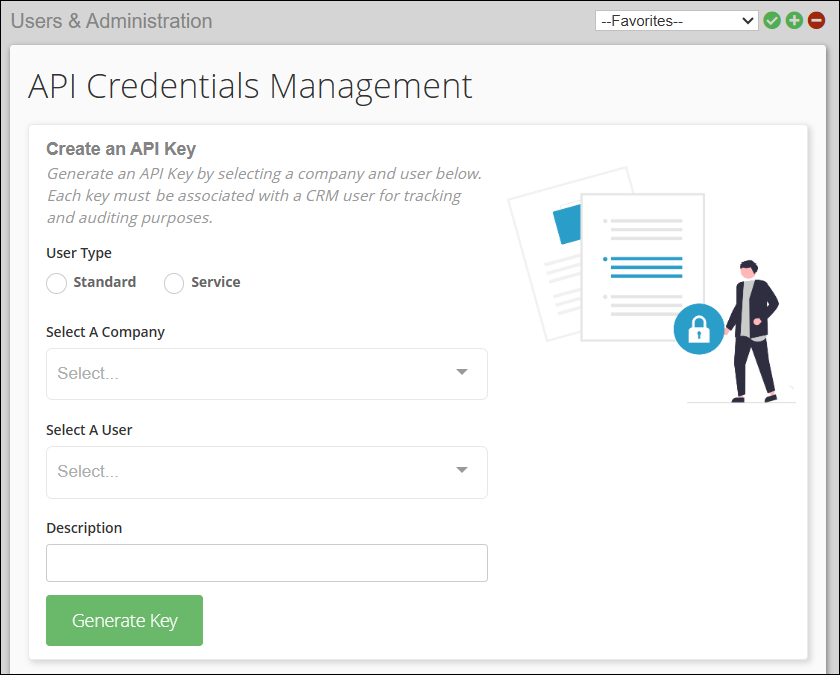
On the API Credentials Management Page:

  1. Select the User Type (Standard or Service)
  2. Choose a Company via the dropdown menu
  3. Select a User via the dropdown menu
  4. Enter a Description
  5. Click the Generate Key button at the bottom left of the section
  6. A pop-up screen will appear, displaying your API Secret and Key ID (see example below).
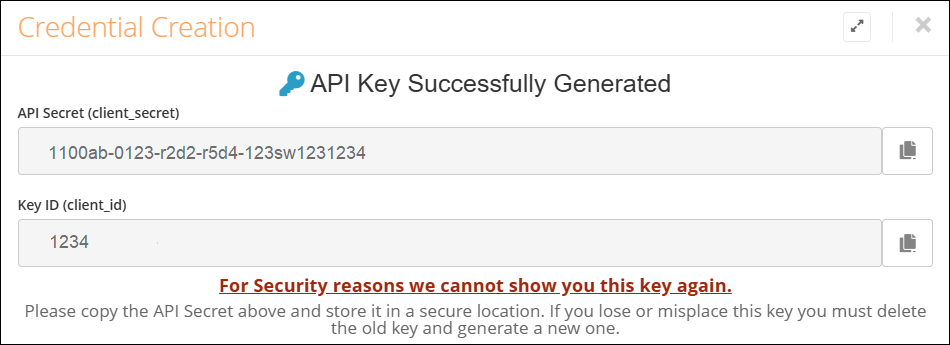
Copy and save both values in a secure location like a secrets or password manager. The API Secret will not be shown again.

3

Obtain Access Token

Use the Get Access Token endpoint to swap your API Secret and Key ID for an access token. The access token expires after 10 days and must be refreshed using this endpoint before the expiration date.

Our APIs use Api Key-based authentication/authorization schemes to create a session. You must pass this access token in the Api-Key header in every HTTP request made to a Forth API endpoint.

On this page
  • Authentication

Error Codes

The Forth API uses conventional HTTP response codes to indicate the success or failure of an API request. In general, response codes fall into these categories:

  • 2xx (Success): The request was successfully received, understood, and accepted.
  • 4xx (Client Error): The request failed due to an issue on your end (e.g., missing parameter, invalid data, lack of permissions).
  • 5xx (Server Error): An unexpected error occurred on Forth’s servers. These are rare, but if you encounter one, please check our status page or contact our support team.

Here are some common error codes you may encounter:

Code
HTTP Status
Meaning
Possible Causes
Resolution Steps

400

Bad Request

The request is malformed or contains invalid parameters.

Missing parameters, invalid JSON format, incorrect data types.

Validate request parameters, check JSON structure, and ensure required fields are included.

401

Unauthorized

Authentication is missing or invalid.

Missing API key, expired token, incorrect credentials.

Include a valid API key, a refresh authentication token, and verify credentials.

403

Forbidden

Client lacks permission to access the resource.

Insufficient user permissions, resource restrictions.

Ensure user has the required permissions, check access control settings.

404

Not Found

The requested resource does not exist.

Incorrect URL, resource deleted or moved.

Verify the request URL, check resource availability.

405

Method Not Allowed

HTTP method is not allowed for the endpoint.

Using GET instead of POST, or vice versa.

Use the correct HTTP method per the API documentation.

429

Too Many Requests

Too many requests hit the API too quickly

Exceeding rate limits

Examine rate limit headers, avoid aggressive retries, ID high-volume processes, and optimize if possible, Exponential backoff of your requests.

500

Internal Server Error

An unexpected error occurred on the server.

Server misconfiguration, unhandled exceptions.

Check server logs, debug application code.

502

Bad Gateway

Server received an invalid response from an upstream server.

API gateway issues, backend server down.

Check backend server health, retry request.

503

Service Unavailable

Server is overloaded or under maintenance.

High traffic, scheduled maintenance.

Retry after some time, check the API status page.

504

Gateway Timeout

Server did not receive a timely response from an upstream server.

Slow database query, network congestion.

Optimize backend response times, increase timeout threshold.

Was this section helpful?

What made this section unhelpful for you?

On this page
  • Error Codes

Developer Tools

Under Construction, Coming Soon!

Postman Collections

To improve the developer experience, Forth will soon be providing users with a convenient way to access and interact with predefined API collections for our various products. By viewing or running these collections in Postman, users can easily test and explore various API endpoints and functionalities.

Was this section helpful?

What made this section unhelpful for you?

On this page
  • Developer Tools

Rate Limits

To ensure platform stability and fair usage for all clients, the Forth API employs rate limiting.

The current Request Rate Limit is set to twenty (20) requests per second for a unique Session ID or IP Address.

Handling Rate Limiting Errors

If you exceed the Request Rate Limit, you will receive an HTTP 429 "Too Many Requests" response code, and your API use will be restricted.

Resolution Options:

  • Wait progressively longer before retrying requests. Avoid aggressive retries.
  • Identify high-volume processes and optimize them (e.g., use bulk endpoints if available, implement caching).
  • If you consistently hit limits due to legitimate high usage, contact us to discuss potential options.
Was this section helpful?

What made this section unhelpful for you?

On this page
  • Rate Limits

User Guides

Our User Guides provide step-by-step instructions and documentation to help you navigate and utilize the Forth API. These guides include best practices and troubleshooting tips to enhance your experience and create better applicausing the Forth API.

On this page
  • User Guides

Core Objects

Our core objects represent the backbone of our APIs. Most, if not all, actions are tied to these core objects and are fundamental to the Forth ecosystem. These objects reflect key pillars of the debt settlement process, from Contacts (the consumers you intend to enroll), to Documents, to communication objects like the Call object to log conversations.

On this page
  • Core Objects

Marketing

The Marketing APIs enable you to manage promotional campaigns, manage email marketing templates and more.

On this page
  • Marketing

Platform Management

The Platform Management section provides functions to effectively manage various aspects of their platform settings. You can configure and customize settings related to account preferences, notifications, and user permissions.

On this page
  • Platform Management

Servicing

The Servicing section of the API allows you to manage and update various settings and configurations for the common servicing functions of debt settlement workflows. This includes creditors, enrollment states, lenders, settlement offers, and transactions.

On this page
  • Servicing

Utilities

The Utilities section provides various tools and functions to assist users in managing and manipulating data within the system. With this section, users can perform tasks such as searching for contacts by phone number and conducting lookups on institutions. Streamline your workflow and enhance data organization with the Utilities section.

On this page
  • Utilities

User Guides

This section contains a user guide specific to the Clixsign feature. Clixsign is Forth's proprietary electronic document signing platform. To enable this platform, please contact Support@setforth.com.

On this page
  • User Guides

Create Signing Request

This endpoint allows you to initiate the sending of a Clixsign document to a specified client. By providing the necessary documents and signer details, you can trigger the document delivery process efficiently.

Was this section helpful?

What made this section unhelpful for you?

On this page
  • Create Signing Request